Shipping Option in WooCommerce

1. Enable Shipping in WooCommerce
- Go to your WordPress Dashboard.
- Navigate to WooCommerce → Settings.
- Click on the Shipping tab.
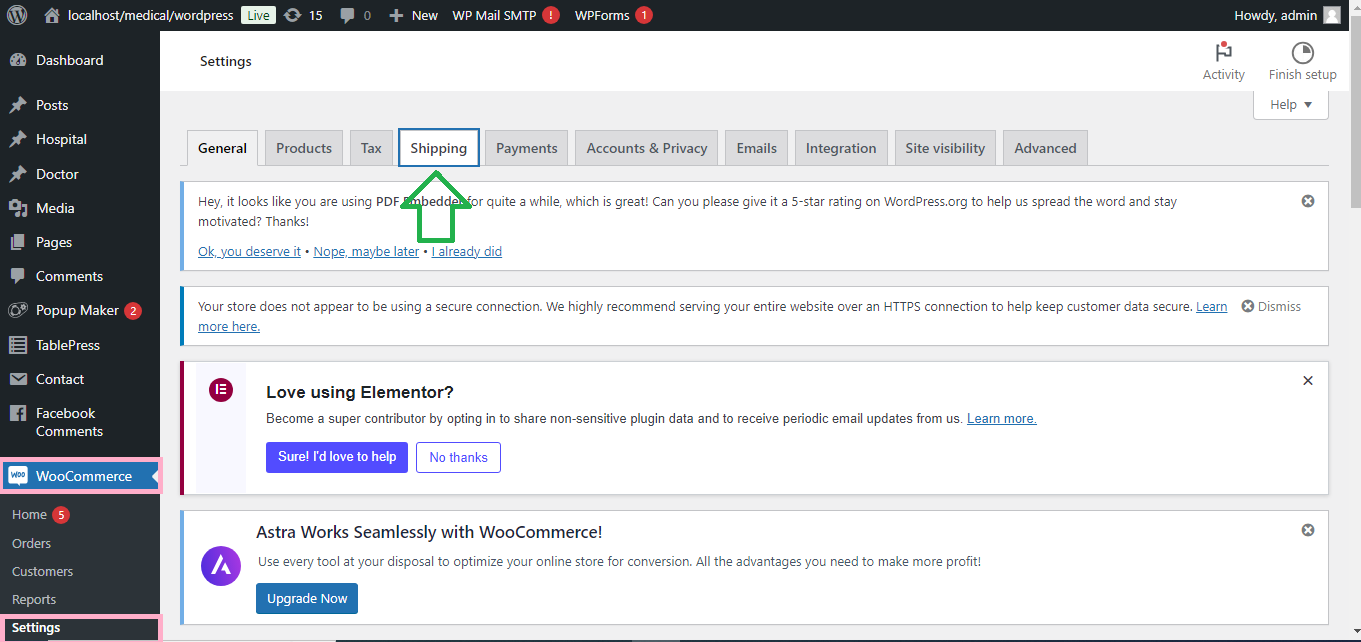
2. Add Shipping Zones
Shipping zones allow you to define different shipping options for different regions.
- In the Shipping tab, click Add shipping zone.
- Enter a Zone Name (e.g., “US”, “Europe”) and select the Zone Regions (countries or regions where this shipping method applies).

- Click Add Shipping Method and choose from the available options:
- Flat Rate: Set a standard shipping cost.
- Free Shipping: Offer free shipping based on specific conditions.
- Local Pickup: Allow customers to pick up products from your location.
- Click Save Changes.

3. Configure Shipping Methods
- After adding a shipping method, click Edit next to the method name (e.g., Flat Rate).
- Set the details:
- Flat Rate: Enter a flat rate for shipping (e.g., $10).
- Free Shipping: Set conditions (e.g., minimum order amount).
- Local Pickup: Set if there are any charges for local pickup.
- Click Save Changes.

4. Set Shipping Classes (Optional)
Shipping classes allow you to group products with similar shipping costs.
- Go to WooCommerce → Settings → Shipping → Shipping Classes.
- Click Add New Shipping Class.
- Enter the Shipping Class Name (e.g., “Heavy Products”).
- Save the shipping class and assign it to relevant products by editing each product.

5. Test Shipping Setup
- Add a product to your cart and proceed to checkout to ensure that shipping options are displayed correctly based on the shipping zone and method you’ve set up.
6. Customize Shipping Page with Elementor (Optional)
- Go to Pages → Add New or edit your Cart or Checkout page.
- Click Edit with Elementor.
- Use the WooCommerce Shipping or Checkout Widgets in Elementor to customize how shipping options appear on the checkout page.
- Customize the layout, style, and display of shipping options to fit your brand’s design.

Your WooCommerce store now has shipping options set up, and you can customize how they’re displayed on the checkout page using Elementor!


